How to find qibla on iPhone: open the built-in Compass app and turn until the bearing it shows matches your qibla number. That number is 278 degrees in Dhaka, 268 in Karachi and 55 in Toronto. Apple lists bearings, coordinates and elevation on the Compass screen, so your number supplies the direction of Makkah (Mecca). Tapping the dial locks your current direction while you lay your mat.
How to find qibla on iPhone compass
Finding the qibla on iPhone starts with a number, not the app. Apple says Compass shows "the direction iPhone is pointing in". The target, where the Kaaba is, has to come from you.
- Write down your number. Search your town on the qibla finder and note the large true-north figure, not the one for a needle compass.
- Let Compass use your location. In Settings, tap Privacy & Security, then Location Services, then Compass, and pick While Using the App.
- Look for a Use True North switch. If the Settings app offers a Use True North switch for Compass, turn it on. If you find none, do the sun check further down before you trust the line.
- Hold the iPhone flat. Apple's Compass guide asks you to keep it level so the crosshairs line up at the centre of the dial. Apple also warns that magnetic or environmental interference can affect accuracy, so stand clear of cars, speakers and metal desks.
- Turn your whole body slowly until the bearing equals your number. Then face the way the iPhone is pointing.
Go by the number, not a compass word like west. Karachi and Dhaka both count as west, yet their numbers sit 10 degrees apart.
| City | Turn until Compass reads | Rough direction |
|---|---|---|
| Dhaka | 278 | West |
| Karachi | 268 | West |
| Sydney | 278 | West |
| Toronto | 55 | North-east |
| Cape Town | 23 | North-north-east |
How to lock the iPhone compass heading
Tap the dial as soon as it shows your number. Apple's guide says this locks your current direction, and that "a red band appears when you're off course". That way you no longer have to hold the number in your head.
Lay the phone flat at the top of your prayer mat, still pointing along your number, and line up the mat's long edge with the phone's side. If the red band appears, you are off course, so turn the phone back to your number before you straighten the mat.
If you pray in one room every day, tape the line to your floor and the phone can stay in your pocket.
True north or magnetic north on iPhone
Your qibla number is measured from true north. A bearing taken from magnetic north is off by the angle between the two norths, called magnetic declination. NOAA says it changes with place and time, which is why step 3 matters.
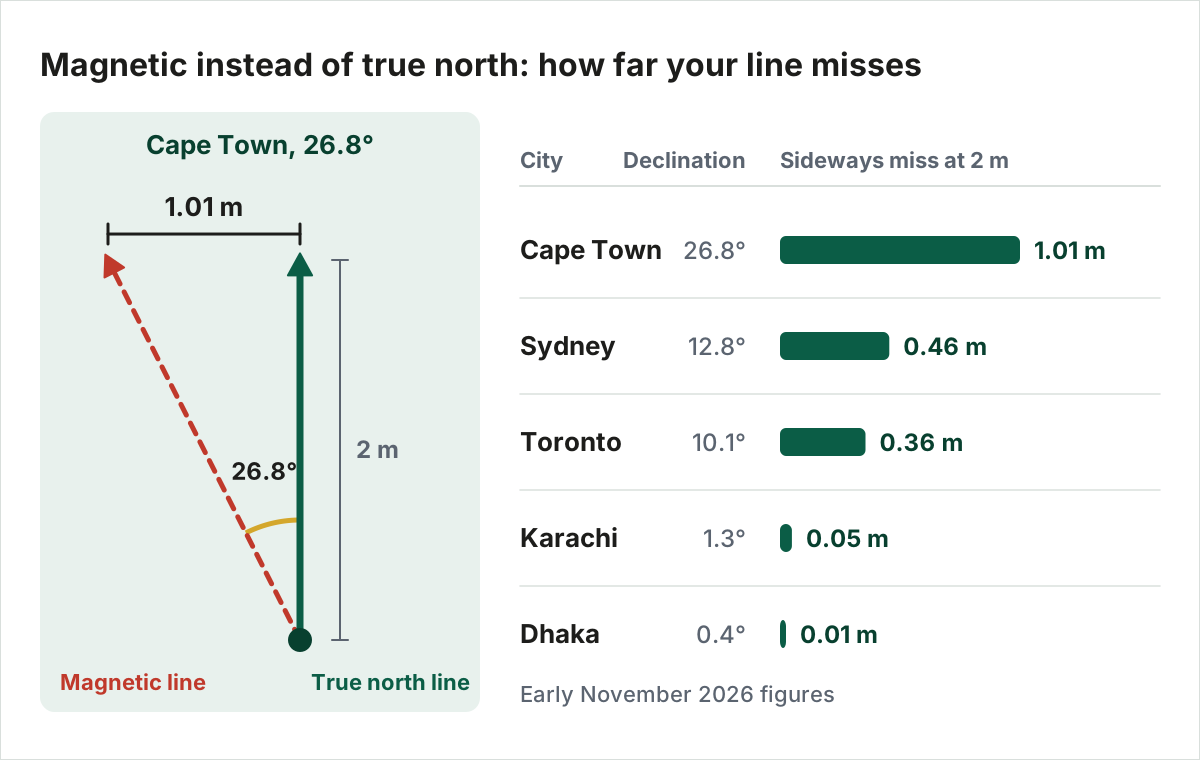
What that costs depends on where you live. In Cape Town a magnetic bearing moves your line a full metre sideways, only 2 metres in front of you. In Karachi or Dhaka the difference is 5 cm or less.
| City | Declination, early November 2026 (degrees) | Sideways miss at 2 m |
|---|---|---|
| Cape Town | 26.8 | 1.01 m |
| Sydney | 12.8 | 0.46 m |
| Toronto | 10.1 | 0.36 m |
| Karachi | 1.3 | 0.05 m |
| Dhaka | 0.4 | 0.01 m |
Location has to stay on too. Apple's documentation for app makers says the phone "needs the current location of the device" to work out a true-north heading. That is why step 2 comes before the switch.
How to check qibla direction on iPhone
Compare degrees, not arrows. A qibla app or page that prints a number should print yours, give or take a degree. If an app shows only an arrow, you have nothing to compare, so pick one that prints degrees.
Researchers at Universiti Teknologi Malaysia (Ismail, Musa and Zainon, 2024) ran 20 popular qibla apps against a surveyed line of just under 293 degrees. Fifteen showed 292. Five showed 295 on both Android and iOS, which the study counts as 3 degrees off. The authors say the gap is "due to the applications, not the platforms".
At 2 metres, 3 degrees moves your line about 10 cm, and the paper calls those apps "still functional". Whether a gap like that matters in prayer is for scholars, and their views on small errors have their own page.
A printed number is worked out from your location, so a match says nothing about the compass sensor. For a check with no magnet in it, use the sun's shadow on a clear day. A hotel's arrow sticker deserves the same doubt, and signs like that have limits of their own.
How to use a qibla compass on Android
Calibrate in Google Maps first, then read your qibla page or app. Google Maps Help says a wide beam, or one aimed the wrong way, means the compass needs calibrating. The fix is a figure 8 until the beam turns narrow, and Google says you only have to do this a few times.
Next, open a page or app that prints degrees, and compare those degrees with your number. The finder from step 1 also works from a typed town.
Android phones with no compass sensor
An Android phone may have no compass sensor. Android's compatibility rules call a 3-axis magnetometer, the compass sensor, "STRONGLY RECOMMENDED", which stops short of requiring one. Your number comes from your town, not from a sensor, and two routes give you a line.
- One borrowed reading. Stand with a friend's phone that has a compass, mark the qibla against one wall, and work from that mark.
- The sun. A clear day gives you a shadow line with no sensor involved, using the method linked above.
Do not fill the gap by ruling your own straight line on a flat map, since that line can point the wrong way.
Why a qibla arrow goes wrong
Match what you see to one row below before you change apps. A new app will not calibrate the sensor or change a setting for you.
| What you see | Likely cause | Fix on iPhone | Fix on Android |
|---|---|---|---|
| Google Maps beam is wide or points the wrong way | Compass needs calibrating | Figure 8 in Google Maps | Figure 8 in Google Maps |
| Same gap every time against a known line | Bearing taken from magnetic north | Use True North on if Settings offers it, or check with the sun | Compare with your true-north number |
| Compass or page cannot find you | Location off | Location Services on for Compass | Allow location for the page |
| Blue dot jumps around in Google Maps | Battery saving | Low Power Mode off | Battery saver off |
| App's degrees differ from your number | Error in the app | Trust your number, turn with Compass | Trust your number, try another page |
Apple's Apple Watch guide names Compass Calibration being off as one cause of compass trouble. It gives the iPhone path to turn it on: in Settings, open Privacy & Security, then Location Services, then System Services.
Close to Makkah, stop relying on a phone. The line shifts quickly as you walk, so follow the rows of worshippers or the mihrab, the niche in a mosque's qibla wall.
Did you find a setting wrong after weeks of prayers? Past prayers made on a bad reading are a separate question with its own answers.
FAQ
What is the qibla direction in iPhone Compass?
Apple's Compass guide lists bearings, coordinates and elevation, not a qibla mark. The qibla is the bearing that matches your town, so the dial should read 55 in Toronto and 23 in Cape Town. That is why you bring your own number and turn until Compass shows it.
Why does my qibla arrow keep moving?
Apple's documentation for app makers names two causes of a heading it cannot trust: the device "is uncalibrated or there is strong interference from local magnetic fields". Step away from metal and electronics, then recalibrate. Google Maps Help gives the same figure 8 motion for Android phones and for iPhones.
How accurate is the iPhone compass for qibla?
Apple does not promise precision. Its guide says to use the digital compass "only for basic navigation assistance" and not to rely on it for precise direction. Treat the reading as a close guide, not a surveyed line, and keep it as close as you can with the settings and calibration on this page.
Is a qibla app better than the Compass app?
Not necessarily. An app adds an arrow and saves you carrying a number. A compass-based app still relies on a compass sensor, which the Malaysian researchers call "sensitive to magnetic interferences". So the same number check applies to it, and Compass needs no download.
Why do two qibla apps point different ways?
Usually one app, one setting or one sensor is off. Compare each app's printed degrees with your qibla number first. Sometimes two travellers still cannot settle it and have no other sign. For that case, Shaykh Yusuf Shabbir's Hanafi answer on IslamQA.org says each prays alone by their own reading.
Conclusion
Once the mat lies on the locked line and no red band shows, the phone's job is done for this prayer, so put it away. The reading that deserves a second look is the first one in a new place. If the battery dies there, a mosque, the stars or a local can still give you the line.